Showing posts with label After Effects. Show all posts

Thursday, 22 May 2014

Using the EVGA Nvidia GTX 780 6GB graphics card with DaVinci Resolve


Thought I would offer some feedback on the new Nvidia GTX 780 with 6GB of GPU RAM (double the original card). The gaming community weren't too enthusiastic about this card saying that the extra RAM would have no effect on game play, but looking at the demands of DaVinci it seemed like the extra RAM would help. Unusually I became an early adopter and bought the EVGA branded card from Overclockers when it was released. Here are my findings.

Prior to installing the new card I had an Nvidia GTX 570 (1.28GB) with an old Nvidia Quadro card. I have a Windows i7 3.6GHz processor with an Asus P9X79 motherboard (not the Pro) and 32GB of RAM, so not a slow machine. 

With this setup HD playback was fine until I added NR or sharpen when playback was 1 or 2 frames per second. As soon as I changed the project settings to UHD the screen filled with shash and I got the message that I was out of memory. I could render out in 4K but it was slow and I could not see the results processing.

With the GTX780 installed in PCIEX16 slot 1 and the GTX 570 in slot 2. Thanks to a tweet form @rohit_bmd I tried removing the GTX570 as he suggested this card may slow things down. He was right and all speeds have increased by 2-3 fps with just the GTX 780 in place.


The result:
In Media and Edit modes the 4K (well UHD) footage from the BMPC plays back at 21 - 23 fps and audio is smooth. This is only on a 1920x1080 computer monitor - I don't have an external 4K monitor yet. 

In Color mode even without adding any grading, NR or sharpening the playback occurs in bursts with a slight pause (less than a second) between each one. DaVinci reports that playback speed is varying between 10fps and 13fps. Adding sharpen lowers this rate to 8-10 fps. Not ideal but at least I can see what the effect the colour correction on a full 4K image. For noise reduction this makes a big difference. I have not received any out of memory pop-ups.

Delivery (rendering) is very quick and I can now see the pictures as they are processed.

The computer RAM is barely being troubled by Resolve and 16GB would be more than enough but the CPU peaks at around 75% usage on playback so a fast processor is recommended. 

An added bonus of the new card is the speed of After Effects which is loving the massive CUDA core boost. 

Conclusion: For the money I think this is an excellent upgrade for DaVinci if you are wanting to work with 4K footage. It surpasses what would be expected from the DaVinci configuration guide from this setup. I think that if I added another GTX 780 6GB card I would be close to running at 25fps in Color mode.

Hope this helps others looking at buying this card. EVGA are offering a step-up if you have an older EVGA card.

Tuesday, 21 May 2013

Filming in RAW with the Canon 5D MKIII

James Miller is a film maker and a brave man. Only a brave man would get hold of a brand new $3000 camera and pull it apart without a manual or a safety net just to see if he can make it slightly better. But then this is a man who likes to take the lens off a camera while it is recording. He calls it lens whacking, I call it art and almost everyone else describes it as a certain guarantee violation and the actions of a man who has spent too much time in the sun, pixel peeping. Well he does call his company Miller and Miller which suggests a measure of schizophrenia.

James is a friend and business partner of Philip Bloom and a pioneer in the world of DSLR cameras. We met once but I doubt he will remember because at the time he was salivating over the recently released Canon C300 and cradling it like a child. Inwardly I'm sure he was harbouring thoughts of dismemberment and performing lewd operations using a mini hex key and a soldering iron. I imagine the gaps between the floorboards in his house are forever swallowing up the miniature screws that keep our cameras together - his are in one piece through the arts of origami and gaffer taping.

The results of this camera butchery can be seen on his website mmfilm and some of it is quite beautiful and really shouldn't be possible using the same camera that I own, namely the Canon 5D MKIII. But his latest experiment is one that I might be willing to try since it doesn't involve physical removal of parts and is provided by Magic Lantern, a group of people who produce software that runs inside many Canon cameras to give features that many of us would give our right testicle for. Fortunately there is no need for such drastic surgery because the software is free.

The latest version works on the 5D MKIII and seemingly doesn't turn the camera into a large paperweight but offers lots of useful options like an intervalometer and bulb ramping for time lapsers and zebra levels, waveform monitors and overlays for video shooters. A full list of functionality can be found here.

This week James released a short "film" on Vimeo called Genesis which was shot on a Canon 5D MKIII (previously taken apart in an earlier, seemingly successful experiment) with the Magic Lantern software installed. What I hadn't mentioned was that the ML software allows the camera to record its footage in a RAW format, Canon's own DNG, in a series of still frames, creating in effect a timelapse, albeit one with 25 frames per second - which eats up 4 GB every minute. This allowed the footage to be imported into After Effects using Adobe Camera RAW and its powerful grading functionality, which is the process I use for my timelapses found here. 

He then exported each clip as a ProRes video and edited in Adobe Premiere. Here is the wonderful video (now a Vimeo Staff Pick no less) entirely shot with a Canon 5D MKIII and a Canon 70-200 L IS II lens, please expand it to full screen or follow the above link to James' Vimeo page:


James appeared only to have shot this as a test, but some of the shots are pieces of art, technically superb and wonderfully framed. He mentions the use of IR contamination which is something most of us would avoid but James uses it on the evening sun to stunning effect. Even viewing the film compressed on Vimeo leaves me impressed and goes to prove that the better the source material the better the final video whether it is H.264 or Blu-ray.

James pushes the boundaries far further than us bi-testicled mortals and hopefully Canon will see that they shouldn't restrict the quality of their brilliant DSLRs to protect their high-end cameras, because Magic Lantern and James will bring the revolution to their door. I expect the 5D MKIII to be spitting out 4K video by the end of the year, it will just take a pioneer like James to make it happen. 

Sunday, 17 February 2013

GoPro 4K and Twixtor - not a viable solution

The most cost effective way of shooting 4K footage today is with a GoPro Hero3 Black edition. With a name like that it should be shaped like a Stealth bomber or Darth Vader's helmet but in fact it looks like this.
The GoPro Hero3 Black
So not much to look at but it does record 4K footage. Actually not quite as the resolution is 3840x2160 not the 4096x2160 (or 4096x2304) generally accepted as 4K, but close enough. Not quite close enough either is the frame rate it records at, which in PAL setting is 12.5 frames per second, half of what is generally accepted and the result is (if the footage is played at normal speed) a pretty jumpy video. But a San Francisco company called Re:Vision Effects Inc. has produced a piece of software called Twixtor which can re-time your video and insert the missing frame through very clever interpolation. It is designed to allow normal speed footage to be slowed down but I thought I would shoot a 4K clip on my GoPro Hero3 Black and see whether Twixtor could make a nice smooth 25fps real speed version of it.

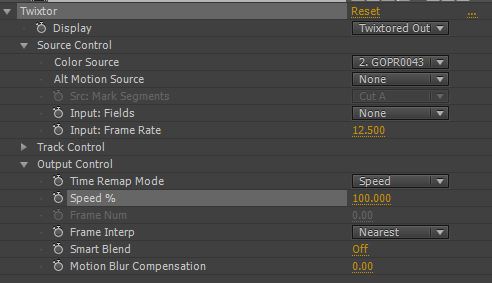
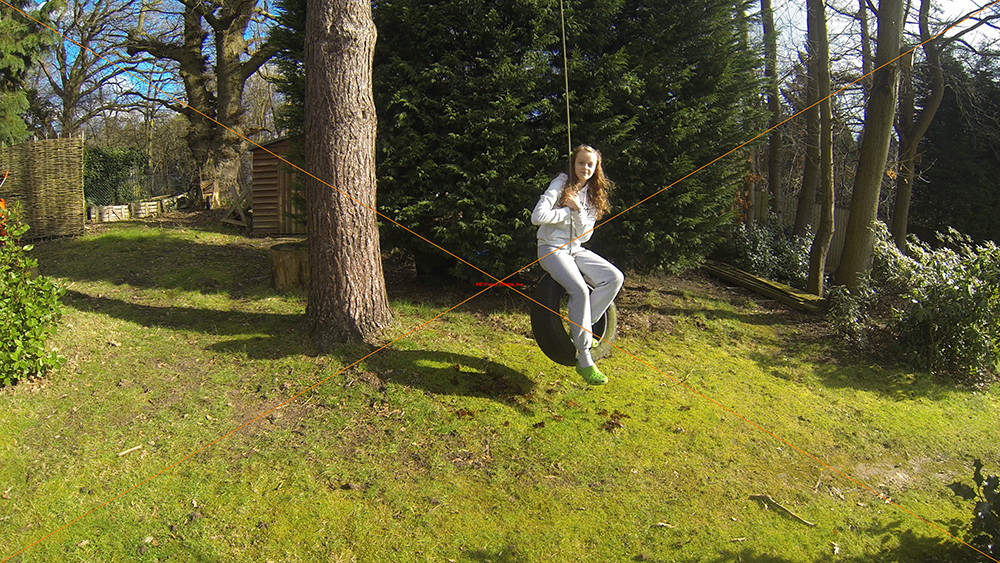
The test footage was shot on a tripod so most of the image was not changing from frame to frame. The girl on the swing is passing across a complex background of leafy trees and a solid tree trunk. The rope tied to the tire is quite thin and had a tendency to warp with some settings. I experimented with a number of settings using Twixtor in After Effects (this is the trial Twixtor software hence the red cross) and this is the best solution I could come up with frame interpolation set to nearest.
Twixtor settings

Here is the treated footage and a link to the 1080p YouTube version.


So to me it is quite smooth and at first look, fairly acceptable, but looking at it more carefully the girl looks like she has been rotoscoped into the video and around her border there is a lot of blurry and incorrect pixels. Here are two screen grabs of an original frame followed by an interpolated Twixtor frame. 
Original frame
Twixtor interpolated frame
And here are crops of the above images
Original frame cropped

Twixtor processed frame cropped
So unfortunately using Twixtor to interpolate the 12.5 frames per second of the GoPro Hero3 in 4K is not going to be the solution to videographers dreams. But all is not lost, because the Sony sensor within the GoPro Hero3 is capable of proper full frame (4096x2160) 4K recording at frame rates of up to 60fps in 10 bit mode and 48fps in 12 bit mode. So GoPro may just be teasing us with the current "gelded" version and the next release may make the Canon 1DX C look like an over priced paper weight. Well a man can dream can't he?
Sony IMX117CQT sensor details