Showing posts with label Canon 1DX C. Show all posts

Tuesday, 25 March 2014

The Blackmagic Production Camera 4K experience Part 1

There has been a huge amount of debate over what the Blackmagic Production Camera (BMPC) would be like to use, and as I finally have one, here are my initial experiences of using it in the real world.


Introduction

In previous blogs I got excited then bored by the long running saga of the BMPC 4K that was announced in April 2013 and eventually started shipping to real users in February 2014. I recently discovered that I was about 20th on the list of my supplier (CVP in London) even though I think I ordered it and put a deposit down within two days of the launch at NAB - this is a popular camera. On 10th March CVP let me know that my camera was in and asked whether I wanted to carry on with the purchase... less than 2 hours later I had it in my hand.

I admit that I did have last minute indecisions about buying the camera, especially as the Panasonic DMC-GH4 had just been launched and the price of the Canon C500 was falling faster than Felix Baumgartner, but the price of the BMPC 4K had also dropped and I felt it was the best solution for me to shoot good quality 4K material.

I had done the same research that many others had performed without actually having the camera and I decided that I would try to get the minimum amount of gear to make the camera work, remembering that I was not hiring the camera out or using it with a client. I already have a decent collection of suitable Canon EF-mount lenses so the only thing I had to get in theory was an SSD card.


SSD Card

There is a notorious list on the Blackmagic Design support pages which gives SSD cards that are "certified" to work with the BMPC but most of them are not available any more. The BM forum is also full of people having problems with SSDs on the Cinema Camera, dropping frames and so on and so I entered the first minefield of decision making with trepidation. 

Cutting to the chase I settled on a pair of SanDisk Extreme II 240GB [SDSSDXP-240G] drives which are not actually on the certified list. These are 7mm thick drives and I had read that even with the shim attached (which comes with the drive) it did not fit the slot in the BMPC too well. Also BM advise that the larger SSDs are faster, although the specs don't agree with this. Well I can report that I have encountered none of the issues above - the drives fit snuggly, don't rattle, but are not too tight to remove with fingers. I have cycled the two drives and after five shoots I have not seen any problems. Shooting 4K ProRes HQ (no RAW available yet) I was getting about 12 secs per GB which is about 48 minutes of footage on a disk. I quick formatted the cards to Ex-Fat each time and I feel these cards should be "certified" soon.


Battery Life

Probably the the biggest concern of many before the launch was how long the fixed battery would last and the answer is NOT BLOODY LONG! I have not timed it but it is nothing like the 2 hours stated in the specifications in real life use. I looked at and rapidly dropped the idea of professional battery packs that added about £600 to the price and looked again at the spec of the camera. 

It is very unfussy about the power source, any DC source from 11-30V is OK. I had a couple of 12V 7Ah batteries that used to power a burglar alarm (they get replaced every 2 years) that I felt would work. I cut the cable off a power supply that used to power an external hard drive and put terminals on the other end. I plugged it into the camera and up came the symbol that the camera was charging - perfect. 

If you can't recycle burglar alarm batteries, you can get the same battery on Amazon for £15.39. The centre pin of the cameras power socket is quite wide so not every plug will fit it. If the camera is on a tripod you can plug it in while using it but I tend to plug it in to the battery when it is in my bag so the camera is normally fully charged when I am ready to shoot. So far I have not run out of power.


Monitor v EVF

I predicted that the screen on the back of the BMPC was going to be more help to my wife putting lipstick on than checking the picture was in focus and so it proved. My first shoot was at sunset so there wasn't much backlight to trouble the screen, but despite using the green focus assist not one shot was in focus. I had to get an external monitor. 

I contacted James Miller, camera guru and infamous lens whacker for his opinion. He had recently been running tests on a BMPC side-by-side with a Canon 1 DC and he told me that an electronic viewfinder (EVF) was essential and preferred over a field monitor mainly because you can close off all the light with your eye.

The output on the BMPC is SDI not HDMI so the EVF had to connect to that and the main options (available in the UK) were by Zacuto, Alphatron (TVLogic) and Cineroid. CVP in London let me look at the first two on my camera and I was impressed by the sharpness of the Zacuto Z-finder EVF Pro and unimpressed by the softness of the Alphatron EVF-035W-3G (so much so that I checked out two in case one was faulty). The focus check on the Zacuto was also significantly better. However the weakness of the cheaper Zacuto was the HDMI connection (which kept cutting out) and that I needed a SDI to HDMI converter. The battery powered BM converter costs over £200 and apparently lasts 2 hours before recharging, so I was not keen on this option. 

CVP didn't have a Cineroid demo unit but the importers Octica let me try out the EVF-4RVW with the "retina" screen and the much cheaper EVF-4CSS. There was a surprising lack of difference between the two and the EVF-4CSS was almost as sharp as the Zacuto. Crucially the EVF-4CSS has SDI connections and was almost half the price of all the others. It's made of fairly cheap plastic and wouldn't survive misuse but that makes it light which is good for me and takes LP-E6 batteries from the Canon 5D's. If you are looking for a reasonable priced EVF for the BMPC I can recommend the Cineroid EVF-4CSS which appears to have been created for the BM cameras.


With the SSDs, my home-brew battery solution and an EVF, the BMPC is a nw a pretty usable camera, and I believe that this is the minimum a sole user would need to get it there. However you do need somewhere to attach the EVF and probably an external mic. You also need to do something with the material you shoot, so in part 2 I will look at an alternative to a cage and some of the issues of post production and post some examples from the shoots.


Saturday, 1 June 2013

Canon EOS 5D MKIII - the Swiss Army knife of video cameras

When the Canon 5D MKIII was launched in March 2012 after years of anticipation the reaction of the market was one of slight disappointment or even indignation. The long delay of the launch (caused in part by the tsunami in Japan) had left everybody expecting a camera that would turn the video shooting world on its head and it seemed that this was just an improvement of the MKII.

Or so it seemed.

I used to work for Bernie Ecclestone on Formula One and I had all these ideas for on-screen information we could provide the viewer and asked why we didn't do them for the new season. Mr E's right hand man Eddie Baker replied "Don't add too many new elements in one go, if you do some of the best stuff will go unnoticed." Gradually in the seasons that followed the on-screen graphics were added to, much to the joy of F1 fans.

In a way the Canon 5D MKIII is the same and has lots of features hidden away that are now being revealed both by Canon and others and I see the camera now has three levels of operation. 

Level 1. This is the camera as it comes out of the box (with original firmware). Shooting to the internal cards using H.264 with All-I compression at 90 MB/s or IPB at 31 MB/s the quality was a distinct improvement on the MKII (especially with the improved low light performance). It is used as a B-roll camera in the main and CF cards don't have to be massive or ridiculously fast. It was a camera used to supplement other cameras.

Level 2. Other cameras such as the Panasonic GH3 started to have the ability to output the video signal through the HDMI monitoring port directly to an external recorder like the Atmos Ninja or the Blackmagic Design Hyperdeck Shuttle. 
Atmos Ninja 2

Blackmagic Design Hyperdeck Shuttle

This could also be done with the MKIII but it was not possible to get a clean output - no information over the pictures including the red recording dot. In October 2012 the Magic Lantern team released Alpha 2 which allowed clean out pictures on the HDMI among a host of other improvements. Six months later Canon released a firmware update that allowed the camera to do the same thing - officially. This gave the MKIII the ability to record in 4:2:2 colour space which I won't explain here but gives more flexibility for colour correction. It also meant it is possible to record in less compressed formats such as ProRes 422. With a proper external sound recorder this brought the MKIII up to A-camera status and it became a more practical unit to use for interviews and documentaries.

Level 3. This was the Level people had dreamed of and hoped for when the MKIII was launched. Because the camera is a DSLR is can shoot still pictures in RAW format which gives simply the best recording format available and the dream was to capture this stream of still images and combine them to a video clip in the way that time lapsers have done for years. But it seemed a pipe-dream until Magic Lantern discovered a way of making the camera do it, and do it to internal recording media. They have just announced the possibility to record 14-bit which gives even more colour information to play with. This level goes beyond that of an A-roll camera and becomes a film camera and the results are quite stunning as James Miller's Genesis film displays.

Level 4 would turn it into a EOS 1DX C+ and record 4K RAW to an external record device. This is my dream and a month ago I wouldn't even have mentioned it in public, but now I don't think it is all that fantastical, I'm sure Magic Lantern think the same. Canon have probably got their fingers crossed that no-one ever achieves it.

So the Canon 5D MKIII really is the most flexible camera around and can be used for everything with the possible exceptions of sports and car chases and the analogy with the Swiss Army knife would be complete if there was a flip out bottle opener in the card bay - Canon please work on that. Design supplied.

Sunday, 17 February 2013

GoPro 4K and Twixtor - not a viable solution

The most cost effective way of shooting 4K footage today is with a GoPro Hero3 Black edition. With a name like that it should be shaped like a Stealth bomber or Darth Vader's helmet but in fact it looks like this.
The GoPro Hero3 Black
So not much to look at but it does record 4K footage. Actually not quite as the resolution is 3840x2160 not the 4096x2160 (or 4096x2304) generally accepted as 4K, but close enough. Not quite close enough either is the frame rate it records at, which in PAL setting is 12.5 frames per second, half of what is generally accepted and the result is (if the footage is played at normal speed) a pretty jumpy video. But a San Francisco company called Re:Vision Effects Inc. has produced a piece of software called Twixtor which can re-time your video and insert the missing frame through very clever interpolation. It is designed to allow normal speed footage to be slowed down but I thought I would shoot a 4K clip on my GoPro Hero3 Black and see whether Twixtor could make a nice smooth 25fps real speed version of it.

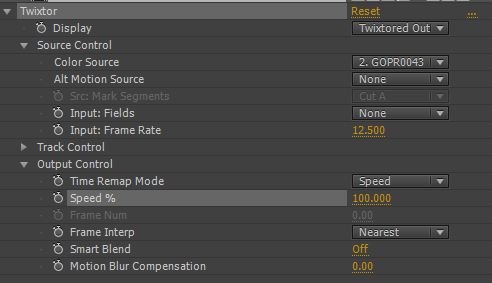
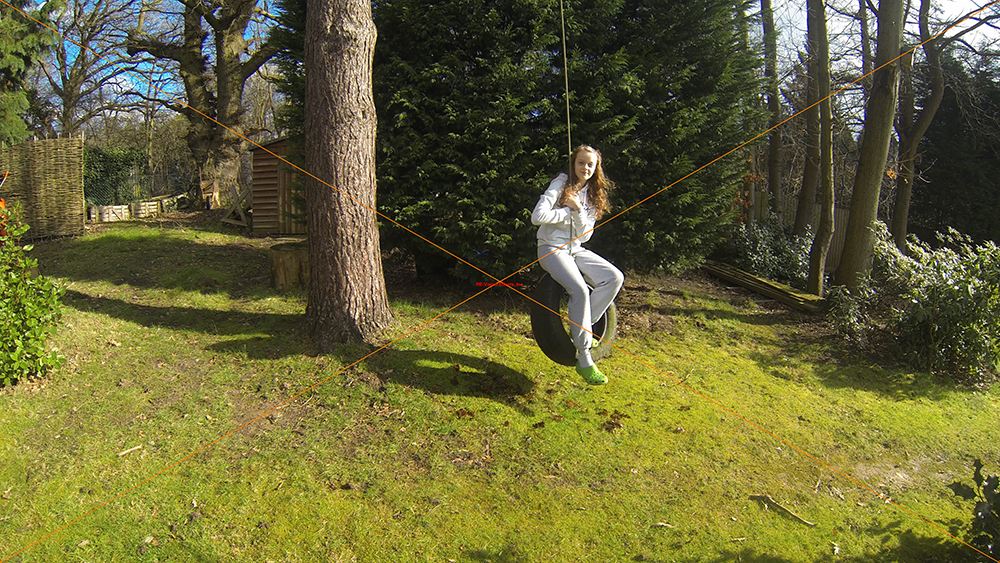
The test footage was shot on a tripod so most of the image was not changing from frame to frame. The girl on the swing is passing across a complex background of leafy trees and a solid tree trunk. The rope tied to the tire is quite thin and had a tendency to warp with some settings. I experimented with a number of settings using Twixtor in After Effects (this is the trial Twixtor software hence the red cross) and this is the best solution I could come up with frame interpolation set to nearest.
Twixtor settings

Here is the treated footage and a link to the 1080p YouTube version.


So to me it is quite smooth and at first look, fairly acceptable, but looking at it more carefully the girl looks like she has been rotoscoped into the video and around her border there is a lot of blurry and incorrect pixels. Here are two screen grabs of an original frame followed by an interpolated Twixtor frame. 
Original frame
Twixtor interpolated frame
And here are crops of the above images
Original frame cropped

Twixtor processed frame cropped
So unfortunately using Twixtor to interpolate the 12.5 frames per second of the GoPro Hero3 in 4K is not going to be the solution to videographers dreams. But all is not lost, because the Sony sensor within the GoPro Hero3 is capable of proper full frame (4096x2160) 4K recording at frame rates of up to 60fps in 10 bit mode and 48fps in 12 bit mode. So GoPro may just be teasing us with the current "gelded" version and the next release may make the Canon 1DX C look like an over priced paper weight. Well a man can dream can't he?
Sony IMX117CQT sensor details