Friday, 3 May 2013

One day my 4K BM Production camera will come - please

There is a bit of a lull in the world of 4K it seems. Sony has established a bit of an unexpected niche in the high end with their F-55; Arri is getting a big boost from its Alexa being used to great affect on Game of Thrones and Canon's much admired C300 has a 4K big brother in the C500. I haven't used any of them, partly because I don't want to spend the price of a convertible Mini on a camera, but mainly because I don't have a crew of 6 six to carry all the peripheral kit that these cameras require.

Of all the specs of all the cameras in all the world this is the one of most interest to me at the moment:

I put my name down for one of these mythical creatures the day after it was announced with CVP in London who don't exactly want to get my hopes up for an early delivery with these words on their website: 

At the moment we're not sure when it is scheduled to ship or will actually ship but based on our experience with the existing 2.5K model we expect long delays.
Our pricing is tentative, so may be adjusted upwards / downwards if the camera price is varied between order placement and shipping date.
Hopefully the price will come down because with exchange rates at the moment the UK price should be £2566 not the £3210 CVP are pricing it at - the difference would pay for quite a few SSD drives I'm going to need.

But the big question has to be the shipping date - what does it mean? The first one, the first 1000, a couple to a shop in downtown Melbourne? Black Magic is one of the most innovative companies in  the camera world but it still relies on component suppliers, one of whom screwed up with the sensors of the first Cinema Camera and rather too many people are still waiting for their cameras who ordered it in the early days.

I have faith though - mainly because I believe Grant Perry would physically drive the white van to deliver the camera because he comes from a post production background, and we post productioners do anything to deliver on time. I mainly shoot stock and I shoot a lot in London and I can't wait to suck the colour out of London and put it onto the screen, even if I will only see a quarter of the picture initially.

I have been promised that within a month I will get my hands on a pre-production model and run a couple of tests. It will probably be raining. This is London after all. At least the lull will be filled.

Tuesday, 9 April 2013

Blackmagic Design Production Camera 4K - initial thoughts.

The old adage "be careful what you wish for" may be true in fairy tales but in real life it can sometimes work out pretty well. In an earlier blog back in January I wrote the following lines:


"My dream machine though is the Blackmagic Design Cinema Camera MKII with a larger sensor (so wide angles are possible) that can shoot 2.5K in RAW and 4K in GoPro's Cineform codec. Even if the price doubled for such a beast I doubt Blackmagic Design would have much trouble selling them."

I even posted a mock-up of the apple of my eye:

My mock-up in January of a dream camera
Well I don't know if Blackmagic Design had been reading my blog but yesterday on day one of NAB 2013 this is what they released:
The Blackmagic Design Production Camera 4K


So I got the logo on the wrong side and it looks like the same designer from Channel 4 in the UK drew up the logo but that doesn't matter, here is a "proper" 4K camera for less than $5,000. To clarify that, you can shoot 4K using a $400 GoPro but not at a broadcast frame rate and the new Blackmagic camera is officially $3,995, but won't work without a fast SSD inside it, oh and a lens would be handy. So let's call it $5K for 4K.

Blackmagic Design have elected not to take up my suggestion of using GoPro's Cineform codec and instead chosen ProRes which is a great format but not when you are using Windows machines. Avid's DNxHD codec has been dropped altogether but if Avid can get their heads out of the sand and come up with a good 4K codec it may be added in a later upgrade. 

A pleasant surprise is that you can shoot compressed CinemaDNG RAW in 4K which for stock material will be fantastic but there is no information I can find about file sizes or how much footage you can shoot in CinemaDNG on a SSD, but with ProRes 4K maxing out at 880 Mbs you only get 36 minutes on a 240 Gb drive. Little caveat here, one bit of the BM blurb says a full version of the DaVinci Resolve grading software is included with the camera but only the lite version is listed in the included software on this Blackmagic page:


Blackmagic Design have dropped the 2.5K resolution that was the main feature of the BM cinema camera, which gave HD editors a bit of leeway for stabilising and shot positioning; now the choice is 1920x1080 or 3840 x 2160 the specification for Ultra-HD. At least it looks like all frame rates including PAL 25p will be working from the start although rather strangely considering the CMOS sensor there are interlaced options in the 1920 resolutions but I can't see this camera being used for sport much.

Although I didn't get the Cineform codec of my dreams I did get my wish for a larger sensor to get wider angles. Below are a couple of grabs from the very useful Abelcine website where you can check field of view for a variety of cameras and lenses. 

The first shows the Super 35mm sensor from the new Production Camera and the field of view using a 35mm lens and on the right is the FOV of the original Cinema Camera. The new camera offers a 39.1 degree angle compared to 25.5 degrees on the original.


The second grab compares the Production Camera (again on the left) with the Canon 5D MKII full frame sensor. The 5D doubles the FOV again with a 54.4 degree so although the new Production Camera gives a much wider view, if you are used to using a full frame DSLR to shoot then you may be disappointed. In fact the new camera is very close to the Canon 7D or Nikon D3100 in field of view.


Within hours of the NAB launch I read criticism of Blackmagic Design retaining the shape of the original camera and the fixed internal battery, but there must have been a huge amount of development to get this form factor and it is also instantly distinguishable from other cameras, which as any marketing student will confirm is a huge advantage. Also like the GoPros, a large number of 3rd party companies have produced vital accessories for the BMCC and these will still be compatible with the new camera.

I think this will be the perfect camera for shooting ultra-hd stock footage and I am extremely pleased that I resisted my urge to order the original camera 12 months ago and can now use another old saying - "good things come to those who wait". Just hope it won't be as long a wait as for the first version; the first cameras are due to ship in July 2013.

Thursday, 21 March 2013

8K - is bigger, better?

A few years ago, well seven I think, I decided that I wanted to find out if my brain was capable of learning new things outside of my comfort zone and after a short investigation I decided to take an Open University course called "T175 - Networked Living", exploring information and communication technologies. It took 8 months to do and at the end of it I had 30 points towards the 360 I need to get a full degree. I was hooked.

Since then I have studied modules called "Beyond Google", "Design and the Web", "Communication and Information technologies" and "Computers and Processors" and a few others. Currently I am doing "Innovation - Designing for a sustainable future" and "Technologies for digital media". 

Coincidently this last module has posed a question about UHDTV or Ultra High Definition TV and refers to a document written by two Japanese engineers, Masayuki Sugawara and Kenichiro Masaoka which looks at the future of TV and what is the ideal size and resolution of screen. They did a series of spatial rendering tests and concluded "that UHDTV should have around 8000
horizontal pixels based on the research results described above. Interoperability with existing television system suggests:
- a picture aspect ratio of 16 : 9 is preferable;
- a simple integer ratio between the pixel counts of TV systems is preferable.
Finally, we concluded that 7680x4320 is desirable for the pixel count of UHDTV." 

Now I can't argue with that especially now that 4K is officially half that resolution. The engineers looked at the ideal size of the screen or panel to watch this on.


"Recommendation ITU-R BT.1845 provides guidelines on the relationship between screen size and viewing distance given that the optimal viewing distance is one at which one pixel corresponds to the visual angle of arc-minute. The optimal viewing distance is, e.g., 100 cm when viewing an UHDTV image on a 100-in screen.[...] The optimal viewing distance for a 20-in screen is 20 cm, at  the human visual system (HVS) reaches the limits of accommodation. The size of a 20-in screen is close to A3, and a 7680x4320 pixel screen would have approximately 350 pixels/in."

Let me just repeat that. The best way to watch TV is on a 100 inch (presume diagonal measurement) screen from just 3 feet 3 inches away - wow! I'm now old enough to need the full length of my arms just to focus on something and I tend to watch a 42 inch 1080p screen from about 8 feet away. And if I wanted to look at an iPad screen (presuming it had 8K pixels) "optimally" it should be about 3 inches away from my face.

Really? If your mother is like my mother she would be telling you to move back from the screen or you'll ruin your eye-sight, and this time she might be right. So if this is the ideal do I want it? Does this mean that if I bought a 100 inch 4K screen ($25,000 says I won't just yet) I could watch it from a comfortable (and ideal distance) of 6 feet 6 inches. At least I wouldn't get yelled out by all the people behind me. Be interested to hear from anyone who has actually stood in front of a 100 inch 4K screen for their opinion.

So my vote is that bigger, in this case is not better, which adds more weight to my argument that 4K will not be a stop gap resolution but a very good and well loved one. Now I better get back to my studies as I still have 2 years to go.

* The full document mentioned above can be purchased here.


Wednesday, 6 March 2013

4K at BVE in London and future proofing

It's been a week since BVE was held at it's new location at Excel in East London and I really enjoyed my two days there, partly for the old colleagues I kept bumping in to, partly because of the new kit I could actually see and touch and partly because of the 4K Cinema presentations. The 3D & 4K Cinema seminars were held in a room about 5 minutes away from the main exhibition so I felt like an orienteerer (or whatever someone who participates in orienteering is called) getting my badge scanned each time I moved between the two locations.

Philip Bloom's excellent presentation "The DSLR journey: from the 5D mkII to the 4K 1DC" was so popular that over 150 people were turned away each day, including me on Tuesday. Philip has not been too positive in the past about 4K's future but one of the reasons I follow him on twitter (@PhilipBloom) is because he is prepared to have his mind changed. He had shot a pop video with Olly Knights on the Canon EOS-1D C the previous week, quickly edited it in Adobe Premiere and Dissolve and produced a 4K ProRes 422 file which the venue guys converted to a DCP to show on the 4K projector at BVE.

The first time he had seen the video in 4K was at rehearsals the previous day, because he, like 99.9% of us working in 4K, doesn't have a 4K monitor (Sony had one on their stand). The only way he could check his pictures at 4K resolution was blowing them up into quarters on his retina screen. I have to say the pictures looked very good and Philip didn't have a massive rig like Canon used on "The Ticket", he just added a TV Logic field monitor:


Canon EOS-1D C on the Ticket (from Canon website)
Philip Bloom (with bag) shooting the Olly Knight video with EOS-1D C
(from Philip Bloom's blog)
The video had been shot very quickly and on the hoof, in Philip's words - guerilla filming - which is pretty incredible at 4K, and he managed to turn it around in about 5 days, which makes a nonsense of anyone claiming that shooting 4K at the moment is impractical.

Of course when you are on an island in the Pacific you might need a bit of backup and Sky's Galapagos series was certainly ambitious. 3D on a volcano - tick, and 4K? Why not. The first episode was shown in 4K 3D (or is it 3D 4K) at BVE and we were suitably furnished with dark glasses, which was a little disappointing. But the effect was not. Once you have seen a marine iguana snort out salt in 3D4K there is little that can impress you. I was in row 6 but wanted to be in row minus 3 to really see the crispness of the image but it was still pretty good from 12 metres away.

In an interview with tech radar this week John Cassy, the head of 3D at Sky TV reaffirmed the company's commitment to 3D and claimed that 4K would not be the innovation that replaces 3D but the technology that enhances the format, "There are very clear benefits that 4K gives 3D. The resolution is better and also it could help in glasses-free 3D because it enables that whole resolution and picture quality." He also claims to have seen a glasses free version of 3D but like a News of the World journalist failed to reveal the source.

Canon's 4K camera the C500 is dropping in price but is still at almost £19,000 so it is a hire only beast for now,but the EOS-1D C £10k less than that but still some way off my Christmas list. To me the cameras that will change the broadcast world though are the Sony PMW-F5 and F55 with the AXS-F5 4K recorder (about £16k and £24k respectively) which get round the rolling shutter problem and are "proper cameras" provided you have perfectly flat shoulders. 


There was a lot of talk about how much storage all this 4K material is going to take up but now I wouldn't consider buying less than 3 terabyte external drives (4 TB are out there), 6 times larger than I was buying 2 years ago. With the amount of storage looking like it will shortly double on a hard drive platter I am looking forward to shooting RAW 4K at a price point close to shooting HD now in about 2 years. 

To conclude I will quote John Cassy of Sky again who sums up my opinion on 4K, "We have a watching brief on Ultra HD and 4K. Actually what we have been doing, the Attenborough shows have all been filmed in 4K - and in some cases 5K - so they have been captured and future-proofed in a sense, as far as we can." 

Future proofing avoids obsolescence, if you get it right.


Sunday, 17 February 2013

GoPro 4K and Twixtor - not a viable solution

The most cost effective way of shooting 4K footage today is with a GoPro Hero3 Black edition. With a name like that it should be shaped like a Stealth bomber or Darth Vader's helmet but in fact it looks like this.
The GoPro Hero3 Black
So not much to look at but it does record 4K footage. Actually not quite as the resolution is 3840x2160 not the 4096x2160 (or 4096x2304) generally accepted as 4K, but close enough. Not quite close enough either is the frame rate it records at, which in PAL setting is 12.5 frames per second, half of what is generally accepted and the result is (if the footage is played at normal speed) a pretty jumpy video. But a San Francisco company called Re:Vision Effects Inc. has produced a piece of software called Twixtor which can re-time your video and insert the missing frame through very clever interpolation. It is designed to allow normal speed footage to be slowed down but I thought I would shoot a 4K clip on my GoPro Hero3 Black and see whether Twixtor could make a nice smooth 25fps real speed version of it.

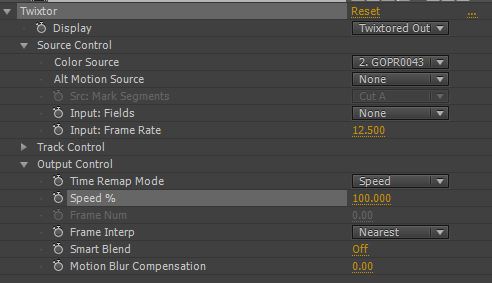
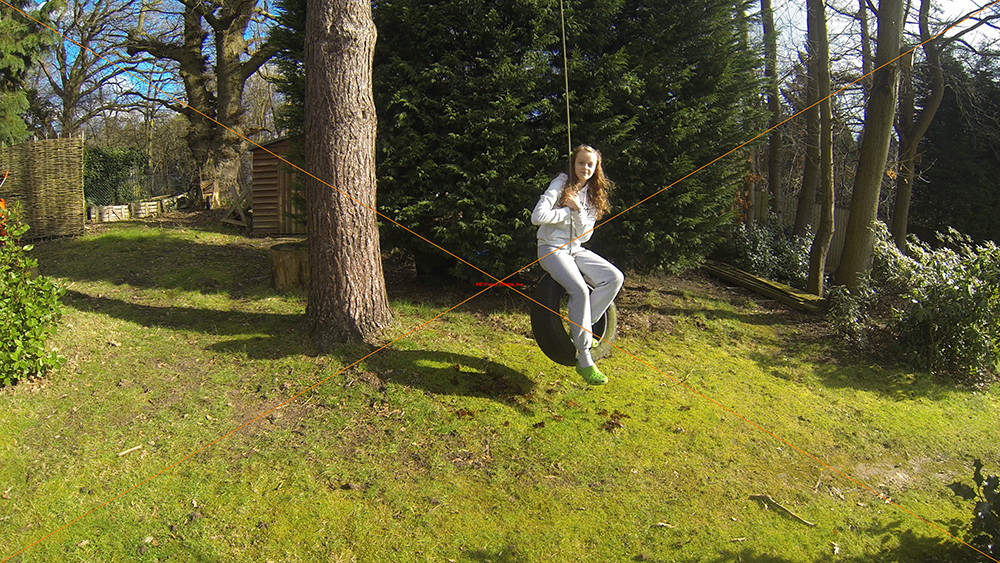
The test footage was shot on a tripod so most of the image was not changing from frame to frame. The girl on the swing is passing across a complex background of leafy trees and a solid tree trunk. The rope tied to the tire is quite thin and had a tendency to warp with some settings. I experimented with a number of settings using Twixtor in After Effects (this is the trial Twixtor software hence the red cross) and this is the best solution I could come up with frame interpolation set to nearest.
Twixtor settings

Here is the treated footage and a link to the 1080p YouTube version.


So to me it is quite smooth and at first look, fairly acceptable, but looking at it more carefully the girl looks like she has been rotoscoped into the video and around her border there is a lot of blurry and incorrect pixels. Here are two screen grabs of an original frame followed by an interpolated Twixtor frame. 
Original frame
Twixtor interpolated frame
And here are crops of the above images
Original frame cropped

Twixtor processed frame cropped
So unfortunately using Twixtor to interpolate the 12.5 frames per second of the GoPro Hero3 in 4K is not going to be the solution to videographers dreams. But all is not lost, because the Sony sensor within the GoPro Hero3 is capable of proper full frame (4096x2160) 4K recording at frame rates of up to 60fps in 10 bit mode and 48fps in 12 bit mode. So GoPro may just be teasing us with the current "gelded" version and the next release may make the Canon 1DX C look like an over priced paper weight. Well a man can dream can't he?
Sony IMX117CQT sensor details


Tuesday, 12 February 2013

4K codecs - the good, the big and the ugly. Part 2

The first part of this blog looked at the file sizes of a 1 second 4K video clip using various QuickTime codecs. This part looks at the image quality of the codecs that use an efficient lossy compression system. Some codecs can compress an image and uncompress it without any loss of information (lossless compression), but these produce extremely large file sizes and I have left them out of this test as they should, in theory, show no difference to the original.   

The codecs compared here are GoPro's Cineform, Avid's DNxHD, MJPEG A, MJPEG B, MPEG 4 and Photo JPEG. Here is the table of file sizes for the various versions I made:


File sizes of 4K 1 second clip
Here is the link to the 1 second clip at HD 1920x1080 size in the MPEG 4 codec at 90%.

I made 2 JPEG (100%) stills of the first frame of the clip. One is the full size 4K image and the other is a 640x360 pixel crop with the image zoomed up to 200%. The cropped image is the top of the tower with the crane by the side. All the images are shown below, but I also made a stack of the crops in Photoshop and sliced out the layers for a comparison. 


Quality of various codecs 90% quality. 200% zoom and cropped
I haven't included MJPEGB here because it is no different from MJPEGA, but both MJPEGs show a large variation in the original colour, lifting the gamma significantly. All the other codecs were consistent and matched the uncompressed version.


The original purpose of this test was to see if the Avid DNxHD codec was suitable for 4K use but when I saw how poor the quality was I looked at all the other codecs to see what was wrong. You can see from the sliced picture how blurred the image of the crane has become, but the MPEG4 version is as sharp as the Photo JPEG image below. I was surprised when I looked at the file size how much DNxHD was compressing the image because I hadn't seen such degradation when editing high definition material and the file size is larger than MPEG4. I rendered out this clip in 1920x1080 with the codecs again set to 90% quality. The DNxHD clip was 44 MB in size and the MPEG4 was only 14 MB in size.


To be precise the HD version of the DNxHD codec was 44,808 KB in size which is exactly the size of the 4K version, which gave the solution. The DNxHD codec is only designed for the 1920x1080 video space and when the image dimension goes beyond that the pixels are duplicated (or more) to fill in the gaps, hence why it is blurred and the file size doesn't increase.

I think this is a mistake and Avid should limit the dimension the codec can produce, like H.264 does. Or it should ignore file size and produce a similar quality of image that the other codecs show here. I assume Avid will come up with a native 4K codec very soon which can be used in the next generation of cameras such as the Blackmagic Design Cinema Camera and their edit tools.

Meanwhile the best solution for moving 4K videos around the web appears to be MPEG 4 because it scales well, reproduces the original colour and is the smallest of all the options. However I hope that the GoPro Cineform codec becomes more widely used (and free) as it is robust and platform agnostic. And of course we wait for the launch of H.265 which is likely to be the choice of the broadcast world.

For videographers producing 4K clips the only solution is to use a lossless codec 

Here are the JPEG images of all the test clips. Please download them to compare.


Cineform 90%
Cineform 90% crop with 200% zoom
Avid DNxHD 90%


Avid DNxHD 90% crop with 200% zoom
MPEG A 90%
MPEG A 90% crop with 200% zoom
MPEG 4 90%
MPEG 4 90% crop with 200% zoom
Photo JPEG 90%
Photo JPEG 90% crop with 200% zoom

Friday, 8 February 2013

4K codecs - the good, the big and the ugly. Part 1

There can be little doubt that there is going to be a huge increase in the demand for 4K footage over the next few years and much of that early demand will have to satisfied by stock material. Currently broadcasters can turn to an enormous library of SD and HD material compiled over decades of shooting, but that won't cut the mustard when intercut with newly acquired 4K footage.

Which is good news for those of us who are planning on making our own library of high quality 4K stock shots. One question I would love to answer is which flavour of 4K will be the choice of stock libraries and I really hope that the big boys can come to some sort of agreement here, because uploading four different versions of a 4K clip is not a quick process.

Now H.265 has been announced and I think this will become the bookies favourite even though its younger cousin H.264 is not currently stock libraries first choice for progressive footage. But efficient as H.265 is, it's unlikely to be a good format to edit with for reasons I won't go into here. This means any stock footage will have to be transcoded to another format or codec before editing.

So I ran some tests on existing codecs using a 4K clip from a time lapse within Adobe After Effects to see if any of them would be good enough to host on the web and edit with natively. Here is a still from the sequence. 


The One Tower, St Georges Wharf, Vauxhall, London
The crane on the tall building behind Vauxhall Bridge was unfortunately hit by a helicopter in January 2013 in case it looks familiar - you can see a 1080p version of the time lapse here. I chose this clip because of the complexity of the image with lots of vertical and horizontal lines and a lot of detail in the sky and water.

Here are the codec candidates:

Avid DNxHD - works on Mac and PC and the codec is free.
BlackMagic codec - great quality but probably too big and not widely used.
Cineform - again works on Mac and PC but you need the Premium version of Cineform Studio to create files and this is $299.
Photo JPEG - An old codec, with good compatibility. Currently the choice of many stock companies but not the most efficient of compression choices.
TIFF - Using LZW compression should give a perfect image but with file sizes to match. Also tried a QT using TIFF.
Animation - Not used so much any more but moving between editing and graphics tools is used to be the king. Huge differences in file size depending on the compression ratio.
MPEG A & B - Had their day I think and largely used only for interlaced  
ProRes - A really great codec but will not play well (if at all) on PCs, which really is a ridiculous situation. If it did this would be numero uno. I'm working on a PC so couldn't produce any test results. Pah!

I created a 4K (4096x2304) 1 second clip in each format at two or three compression settings (75%, 90% & 100% where possible) to look at file size and quality. Here are the results:


File sizes of  1 second 4K clip in various codecs 
The TIFF sequence adds up to 288 MB for the 25 frames. 

Unsurprisingly the uncompressed or lossless compression codecs are significantly larger than the lossy compressed versions. The embedded TIFF QTs were significantly larger than the sequence of stills using the LZW lossless compression and the TIFF sequence would still be a good way to exchange between editing and graphic systems.

The lossy compression codecs start with Cineform (100% quality) at 126 MB for a 1 second clip. Bearing in mind that the maximum  length of a clip on iStock is 30 seconds and you could end up with a files of 3.78 GB! At 75% quality it would be a mere 1.8 GB

The tests showed that DNxHD 444 10 bit was almost the same size at 100%, 90% and 75%. Somewhat surprisingly it made little difference on MJPEG codecs whether 75% or 90% compression was chosen. But Cineform at 100% jumped up to 126 MB - almost double the 90% file size, which shows remarkably efficient compression if the quality stands up.

Photo JPEG and MPEG4 also showed a big difference between 75% and 90% and a 30 second clip at the higher compression (75% quality) would be just over 1 GB in size.

In Part 2 of this blog I look at the picture quality of the smaller files to see whether they have a future as a 4K stock format.